
Smile for 10% Off: Private Face Detection in the Browser
In 2013, a ticket machine appeared in the Moscow metro which gave commuters a free ticket, if they could do 30 squats in two minutes. A sensor counted the reps and, knees permitting, printed a ticket.
It was a temporary promotion ahead of the Sochi Winter Olympics, but I loved the idea - do something positive for yourself, get something useful back.
I was thinking of this recently while working on some experiments of my own. I've been working on a presentation called Delete Your Dependencies, trying to see how far we can get with modern, native browser features before we need to turn to external plugins. I like the idea of doing something good for yourself and getting something back, so what about a coffee shop which offers a discount if it sees your smiling face? And from that, Smile Coffee was born! Walk up to the till, give it your best smile, and get a 10% discount. Start your day with a smile and a cheaper coffee - what's not to love?
Smile Coffee, start to finish.
Funnily enough, just as I was finishing it, Revolut launched "Pay with Smile", a three-day pilot in three London cafés. A smile at the coffee counter again, but this time the smile is the payment - your face gets matched to your Revolut account. That's a very different proposition on the privacy side, and we'll come back to it later on. But first, we've to figure out how we as developers are going to implement this.
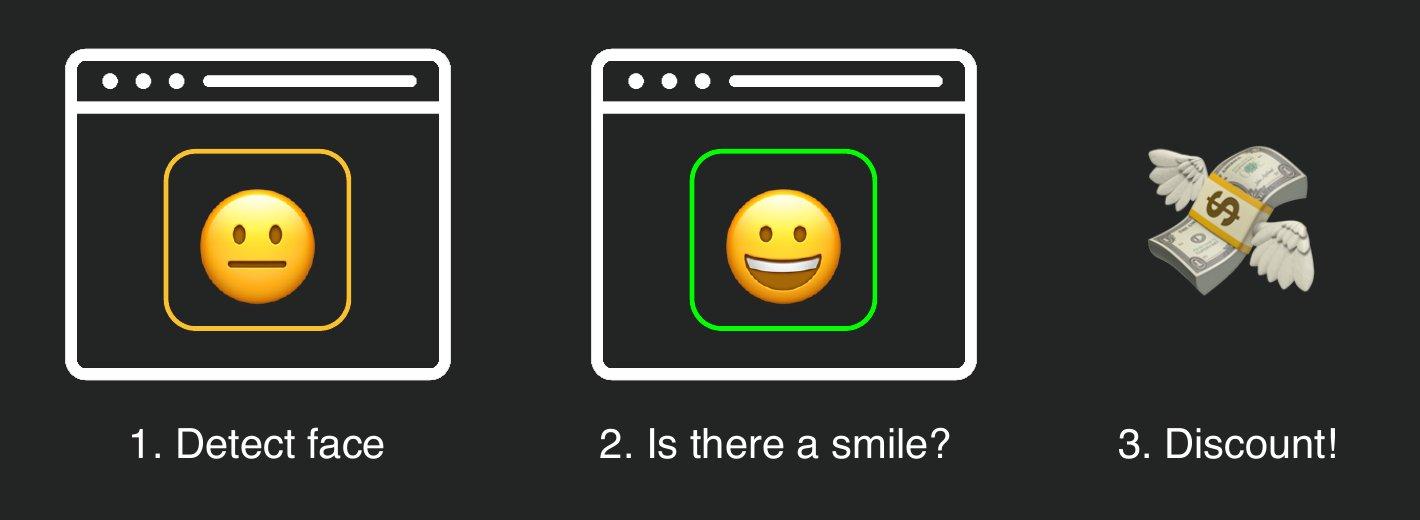
The plan, in three steps.
A customer walks up to the till, and a camera takes a look. If it finds a face, and that face is smiling, the discount unlocks, and we snap a photo. They pay by card as normal, and head off with a cheaper coffee, plus a receipt showing off their beautiful smile.
In this first part, we'll handle everything up to the payment: detecting a face and a smile without sending any video to a server, unlocking the discount, and capturing that photo. In part two, we'll take the card payment on a Stripe Terminal reader, and print the photo on the receipt. The full project is in the smile-printer repository on GitHub.
Turn on the camera
Not that long ago, this would have meant a native app, a camera SDK, and a video stream shipped off to somebody else's machine-learning API. These days, the browser will do most of it for us, starting with the camera. It needs a secure context - HTTPS, or localhost while developing - and we only ask for video:
const stream = await navigator.mediaDevices.getUserMedia({
  video: { facingMode: 'user', width: { ideal: 1280 }, height: { ideal: 720 } },
  audio: false,
})

video.srcObject = stream
await video.play()
The <video> element gets playsinline, so mobile browsers don't open it full-screen, and a CSS transform: scaleX(-1), so it behaves like a mirror. People expect a selfie camera to be mirrored, and it's surprisingly disorientating when it isn't!
It's worth planning for the camera not working. Permission can be refused, another app can be using the camera, and plenty of desktops don't have one. getUserMedia() rejects with a named error (NotAllowedError, NotFoundError and so on), so the demo can show a helpful message and a "Try camera again" button. Most importantly, the till still takes payment, just without the discount. A broken camera shouldn't stop anyone buying coffee.
Find a face, natively
Browsers have a native Shape Detection API, which hands image detection over to the operating system. Its FaceDetector is still experimental - in Chrome, it's behind the chrome://flags/#enable-experimental-web-platform-features flag - but with that switched on, drawing a box around a face takes a handful of lines:
if (!('FaceDetector' in window)) {
  throw new Error('No native FaceDetector here!')
}

const detector = new FaceDetector({ fastMode: true, maxDetectedFaces: 1 })

async function tick() {
  const [face] = await detector.detect(video)

  context.clearRect(0, 0, overlay.width, overlay.height)
  if (face) {
    const { x, y, width, height } = face.boundingBox
    context.strokeRect(x, y, width, height)
  }

  video.requestVideoFrameCallback(tick)
}

video.requestVideoFrameCallback(tick)
requestVideoFrameCallback() runs our function once per new video frame, rather than guessing with a timer. No library, no model download - the browser does all the work.
So what does it actually give us? Here's the face it found in my webcam feed, logged to the console in Chrome on macOS:
console.log(face)
// {
//   boundingBox: { x: 398.75, y: 191.25, width: 460, height: 460, ... },
//   landmarks: [
//     { type: 'eye', locations: [{ x: 538.75, y: 331.25 }] },
//     { type: 'eye', locations: [{ x: 718.75, y: 331.25 }] },
//     { type: 'mouth', locations: [{ x: 628.75, y: 536.25 }] },
//   ],
// }
A bounding box in video pixels, and a handful of landmarks: where the eyes and mouth are.
Its sibling, BarcodeDetector, is the more mature member of the family, and uses exactly the same detect() call to read QR codes from a camera feed. It's available in Chrome on macOS, Android and ChromeOS, and the delete-your-dependencies demos include a working QR scanner if you'd like to try it.
A mouth, but not a smile
So we have a face. Is it smiling? Here's everything FaceDetector will tell us about the mouth:
const mouth = face.landmarks.find((landmark) => landmark.type === 'mouth')
console.log(mouth)
// { type: 'mouth', locations: [{ x: 628.75, y: 536.25 }] }
A single point. Other platforms can return a few more points around the mouth, but none of them tell us anything about its shape. We know where the mouth is, but not what it's doing. We could try to infer a smile from those points, but that's unlikely to give us very accurate results.
This is where the platform runs out, and the one place we bring in a dependency: MediaPipe Face Landmarker. It still runs entirely on the device, using WebAssembly, and alongside a detailed 478-point face mesh, it gives us blendshape scores for expressions like mouthSmileLeft and mouthSmileRight. It's the only library doing any of the detection.
Is that a smile?
MediaPipe comes from npm (npm install @mediapipe/tasks-vision). There's no build step in the demo: its server simply serves the package's vision_bundle.mjs and wasm/ folder at /vendor/mediapipe/, and points at the model file, which is a few megabytes. Here it's downloaded from Google's model storage, but it's just a file, so it can be self-hosted too. Either way, it's downloaded once, and no camera frames are sent back the other way.
We load it once, asking for blendshapes:
import { FaceLandmarker, FilesetResolver } from '/vendor/mediapipe/vision_bundle.mjs'

const MODEL_URL =
  'https://storage.googleapis.com/mediapipe-models/face_landmarker/face_landmarker/float16/1/face_landmarker.task'

const vision = await FilesetResolver.forVisionTasks('/vendor/mediapipe/wasm')
const landmarker = await FaceLandmarker.createFromOptions(vision, {
  baseOptions: { modelAssetPath: MODEL_URL, delegate: 'GPU' },
  runningMode: 'VIDEO',
  numFaces: 1,
  outputFaceBlendshapes: true,
})
Then, on each video frame, we ask it what it sees. The smile score is the average of the left and right sides of the mouth, between zero and one:
function checkFrame() {
  const result = landmarker.detectForVideo(video, performance.now())
  const blendshapes = result.faceBlendshapes[0]?.categories ?? []
  const score = (name) => blendshapes.find((c) => c.categoryName === name)?.score ?? 0

  const smile = (score('mouthSmileLeft') + score('mouthSmileRight')) / 2
  if (smile > 0.65) unlockDiscount()

  video.requestVideoFrameCallback(checkFrame)
}

video.requestVideoFrameCallback(checkFrame)
And with that, we have a working smile detector, running entirely on the customer's device.
There is one catch, though. The model measures the shape of a smile, not whether the person behind it means it. A forced, through-gritted-teeth grimace scores just as well as genuine delight - as my own photos later in this post rather painfully demonstrate. Still, marketing's poster only says "smile". Nobody said anything about meaning it.

Read the small print: there isn't any.
(A genuine smile tends to reach the eyes, and MediaPipe does report blendshapes like eyeSquintLeft and cheekSquintLeft. We could try to insist on sincerity... but a till that tells customers their smile isn't convincing enough feels like it would undo all the good work.)
A smile isn't a discount yet
That first version worked, but felt twitchy. The face box wobbles from frame to frame, and the smile score can spike over the threshold for a single frame - someone mid-sentence could unlock the discount by accident.
The fix is a small state machine. MediaPipe's face mesh gives us a bounding box for the face, and the face has to hold reasonably still for 1.5 seconds. Then, the smile has to stay above the threshold for a full second:
function updateFaceState(box, smileScore, now) {
  if (!anchor || !isFaceStill(box, anchor)) {
    anchor = box // the hold (re)starts from here
    steadySince = now
    smilingSince = null
  }

  if (now - steadySince < 1500) return show('red', 'Hold still!')

  if (smileScore < 0.65) {
    smilingSince = null
    return show('orange', 'Now smile!')
  }

  smilingSince ??= now
  if (now - smilingSince < 1000) return show('orange', 'Keep smiling…')

  unlockDiscount(box)
}
"Still" means that since the hold started, the centre of the face hasn't moved more than about 8% of its size. That's loose enough to ignore normal camera jitter, but tight enough that a second person can't wander into the frame and inherit somebody else's progress.
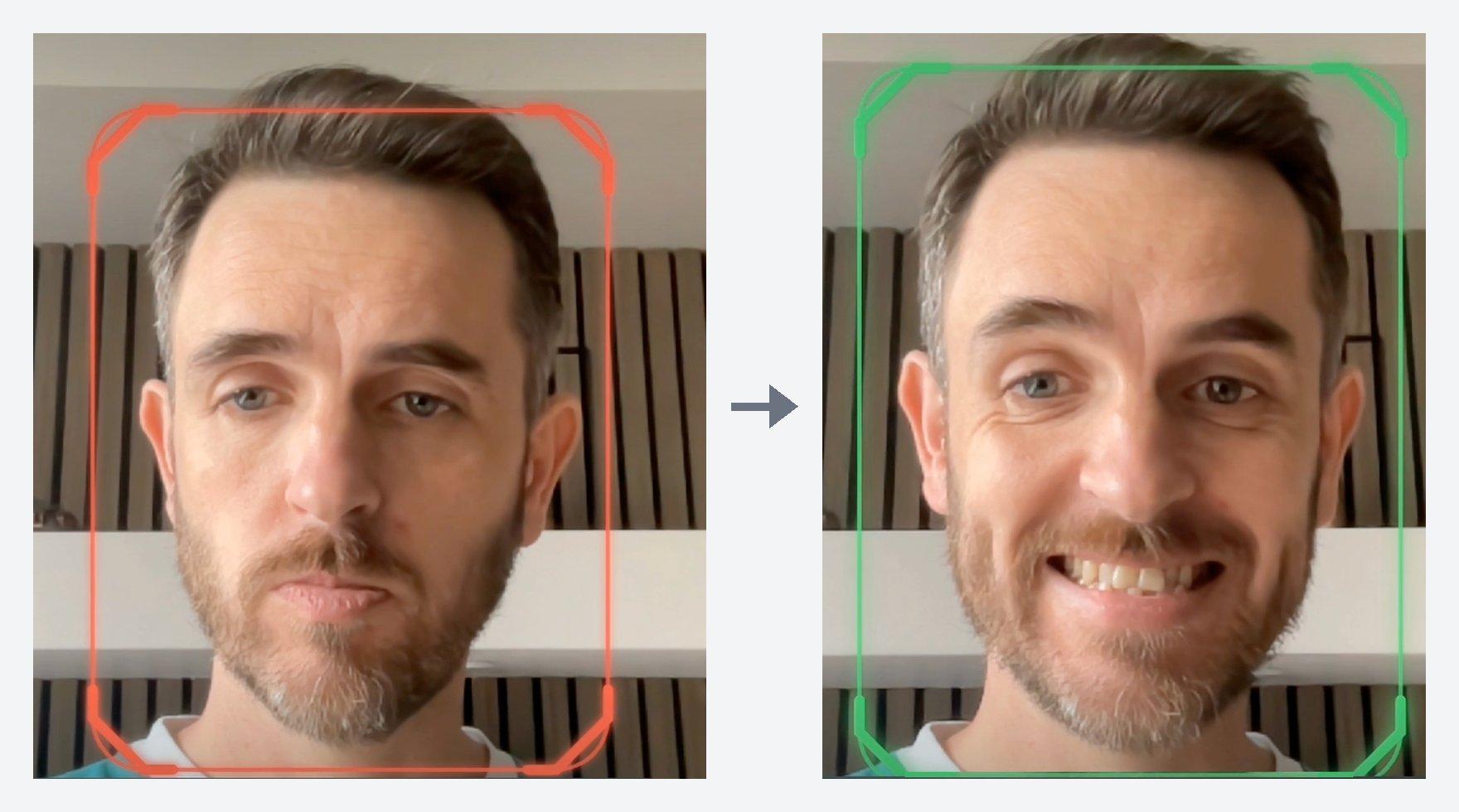
Face found, but no smile yet (left). Smile held for a second, discount unlocked (right). Sincerity not required.
Mirror, mirror
Remember that CSS flip? It only changes what the customer sees. MediaPipe gets the raw, un-flipped camera image, so every face box it returns is the wrong way round. Draw it as-is, and the outline drifts in the opposite direction to the customer's head, which is a great way to make someone dizzy. The overlay has to mirror each box (and allow for the video being cropped to fit its container) before drawing it.
The same applies to the photo for the receipt. Once the smile has held for a second, we crop one still from the current frame, flipping the canvas so it matches what the customer saw on screen:
function captureFace(box) {
  const canvas = document.createElement('canvas')
  canvas.width = Math.round(box.width)
  canvas.height = Math.round(box.height)

  const context = canvas.getContext('2d')
  context.translate(canvas.width, 0)
  context.scale(-1, 1) // mirror, to match the preview
  context.drawImage(
    video,
    box.x, box.y, box.width, box.height, // source, in video pixels
    0, 0, canvas.width, canvas.height, // destination
  )

  return canvas
}
That canvas stays in browser memory. It isn't sent anywhere until the customer has actually paid.
Make it fast: move the model off the main thread
At this point, everything works - but the page starts to feel sluggish. The video plays smoothly, yet buttons take a noticeable moment to respond to clicks. MediaPipe's detectForVideo() is synchronous, and its own docs warn that it blocks the thread it runs on. We're calling it every frame, on the same thread that handles every click.
The fix is to move the model into a Web Worker. The package's vision_bundle.js defines a global Vision object, so a classic worker can load it with importScripts(), set the model up the same way as before, and then wait for frames:
// face-landmarker.worker.js
importScripts('/vendor/mediapipe/vision_bundle.js')
const { FaceLandmarker, FilesetResolver } = Vision

const MODEL_URL =
  'https://storage.googleapis.com/mediapipe-models/face_landmarker/face_landmarker/float16/1/face_landmarker.task'
let landmarker

async function init(delegate) {
  try {
    const vision = await FilesetResolver.forVisionTasks('/vendor/mediapipe/wasm')
    landmarker = await FaceLandmarker.createFromOptions(vision, {
      baseOptions: { modelAssetPath: MODEL_URL, delegate },
      runningMode: 'VIDEO',
      numFaces: 1,
      outputFaceBlendshapes: true,
    })
    self.postMessage({ type: 'ready' })
  } catch (error) {
    self.postMessage({ type: 'init-error', message: error.message })
  }
}

self.onmessage = ({ data }) => {
  if (data.type === 'init') return init(data.delegate)

  try {
    const result = landmarker.detectForVideo(data.bitmap, data.timestamp)
    // summarise() boils the result down to { box, smileScore }, or null
    self.postMessage({ type: 'result', face: summarise(result) })
  } catch (error) {
    self.postMessage({ type: 'error', message: error.message })
  } finally {
    data.bitmap.close() // free the frame's memory straight away
  }
}
A worker can't see the <video> element, so once the worker says it's ready, the main thread grabs each frame as an ImageBitmap and posts it across:
const worker = new Worker('/face-landmarker.worker.js')
let frameInFlight = false

async function captureFrame(now) {
  if (!frameInFlight) {
    frameInFlight = true
    const bitmap = await createImageBitmap(video)
    // The second argument transfers the pixels, rather than copying them
    worker.postMessage({ type: 'detect', bitmap, timestamp: now }, [bitmap])
  }
  video.requestVideoFrameCallback(captureFrame)
}

worker.onmessage = ({ data }) => {
  if (data.type === 'ready') return video.requestVideoFrameCallback(captureFrame)

  frameInFlight = false
  if (data.face) updateFaceState(data.face.box, data.face.smileScore, performance.now())
}

worker.postMessage({ type: 'init', delegate: 'GPU' })
Two details make this work well:
- Transfer, don't copy. Passing
[bitmap]as the second argument hands the frame over to the worker, rather than copying all of its pixels every time. - Only one frame in flight. If detection is slower than the camera, posting every frame builds an ever-growing queue. The detector falls further and further behind, and eventually announces a smile several seconds after the customer has stopped smiling. Waiting for each answer before sending the next frame keeps it in real time.
The GPU delegate isn't available on every device, so the demo tries GPU first. If the worker replies with init-error, it's terminated, and a fresh worker is started with CPU instead. Either way, the main thread never touches the model, and the till stays responsive.
Clean up after yourself
Camera and machine-learning demos have a distinctive way of failing: the page looks closed, but something expensive is still running. During development, Chrome would occasionally reload into a black camera frame, with the previous session's green outline still sitting on top of it.
The lessons from fixing that:
- Stop every camera track when the page is hidden (
pagehide), and restart the camera inpageshowif the page comes back from the back/forward cache. - Close every
ImageBitmaponce the worker has finished with it. At a dozen frames a second, unclosed bitmaps eat memory quickly. - Terminate the worker, rather than asking it to tidy up. MediaPipe's own
close()has been reported to freeze the browser during navigation.worker.terminate()takes everything with it.
Detection isn't recognition
Revolut's Pay with Smile looks like the same idea on the surface, but the two are asking completely different questions:
| Revolut Pay with Smile | Smile Coffee | |
|---|---|---|
| The question | Who is this? | Is there a face, and is it smiling? |
| The face is… | The credential that authorises payment | A gesture; the card is still the credential |
| Compared against | The selfie from account sign-up | Nothing |
| If it's fooled | Someone else's account pays | Someone holding up a photo gets 10% off |
In the jargon, that's face recognition versus face detection. Once a face is the payment method, the system has to store something to match it against, be very sure it's looking at a live person rather than a photo, and keep false matches incredibly rare. Revolut says the facial data is encrypted end-to-end, and I'd expect the details to get plenty of attention as the pilot grows.
Our demo gets to skip all of that. There's no enrolment, no stored face, and nothing to match against. When the worst case is a slightly cheaper coffee, we can afford to keep everything on the device.
Privacy rules tend to draw the same line: using a face to work out who someone is gets treated far more strictly than spotting that a face is there. A photo of a face is still personal data, though, so anything beyond a demo deserves proper advice - I'm a developer, not a lawyer! But it's a good principle to build around: if we don't need to know who someone is, we shouldn't build a system that can find out.
Where the privacy boundary sits
"Private by design" is easy to write next to a padlock icon, so it's worth being specific about where everything goes:
| Data | Where it's processed | Leaves the browser? |
|---|---|---|
| Live video frames | Web Worker | No |
| Face position and smile score | Web Worker | No |
| Captured photo | Browser memory | Only after payment, as part of the receipt |
| Receipt image | Our server, then Stripe | Yes, to be printed |
The photo only exists once the discount is unlocked. It only leaves the browser once the customer has paid, as part of the receipt image, which goes via our server to Stripe for printing - and our app never writes it to disk. Beyond the page itself, the only thing the detection needs to download is the model file, and nothing goes back the other way.
We now have a discounted total and a photo of a smiling(ish) customer. In part two, we'll take a card payment on a Stripe V660p reader, turn that photo into something a one-bit thermal printer can handle, and print it once the payment is confirmed.
The code for this series is in the smile-printer repository. If you'd like to see what else the browser can do without a dependency in sight, the delete-your-dependencies repo has runnable demos of screen capture, cross-tab messaging, Web Bluetooth and on-device AI. They're the companion to my Delete Your Dependencies talk, which has slides and details of where I'm giving it.