
Predictable Cross-Currency Payments with Stripe's FX Quotes API
Expanding your online business internationally is easier now than it has ever been. With more and more people using digital payment methods, improved marketing and advertising tools make it possible to quickly find and serve new customers, all over the globe.
While this growth is great, it does bring some new challenges. A key one is handling the cost of converting currencies between your local currency and the ones your customers want to use. Accurately reconciling transactions while FX rates move underneath you is no fun. Fortunately, Stripe now offers a way to remove that uncertainty.
Background
Historically when businesses expanded internationally, they would often show customers the same currency everywhere - usually US dollars, or sometimes euros. Any customers in countries with different currencies outside these regions would pay in USD/EUR, but then would be charged an additional conversion fee by their banks. This impacts conversion rates, with customers often unsure of exactly how much they'll be charged after these fees get added.
Platforms like Stripe make it easy to offer customers prices in their local currency, then have it converted back to your operating currency. The technical terms here are presentment currency (what the customer pays in) and settlement currency (what you ultimately receive). Stripe normally converts between these automatically using mid-market rates plus a small margin. Job done, nice and easy, and lots of new happy customers - all paying in their local currency, while you receive it in your currency of choice!
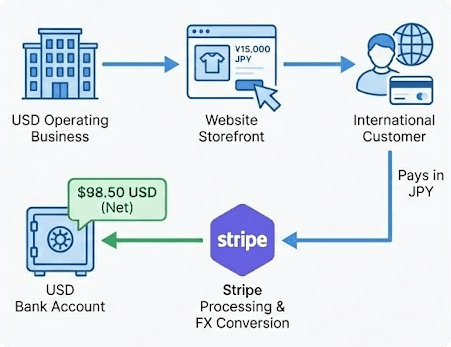
Automatic currency conversion
A challenge this introduces is knowing exactly how much money you're going to get back in your "home" currency. FX rates fluctuate all the time, so while you can estimate the conversion, chances are you'll consistently be facing accounting challenges for over/under estimating the amount which ultimately lands in your bank account.
Stripe's FX Quotes API is designed to remove that guessing.
Today we're going to look at what the API actually does, why it's useful, and how to integrate it into both Payments and Connect flows. Along the way we'll look at directionality (the thing that catches most people the first time) and some practical examples of how to use the API.
What the FX Quotes API Is
At its simplest, the API lets you request a quote for a conversion from one currency into another. The rates returned are guaranteed to hold for a given period of time. We can attach that quote to a PaymentIntent, Transfer, or supported object, and Stripe guarantees the conversion will happen at that rate for as long as the quote is active.
It's a deliberate shift from "we'll convert at whatever the rate happens to be at settlement" to "this is the rate we will use, full stop". That predictability is the main value proposition here. If you've ever reconciled multi-currency payments having been at the mercy of a floating exchange rate, you'll immediately appreciate why this is helpful.
Why This Is Helpful
Anyone working across currencies eventually discovers how slippery exchange rates can be. Small movements can create reconciliation noise, erode margins, or cause transfers to land slightly off the intended amount. Imagine you estimate a conversion price for a customer at €94.29 today, but the FX rate shifts before capture and they're billed €96.02. Or imagine a connected account expecting €20 but receiving €19.85 after settlement. These seem small individually but create support overhead and reconciliation friction at scale.
That's a sometimes-tolerable pain when you're converting your own revenue. It's far less practical when:
- you're trying to display a final price to a customer in their local currency,
- you're operating a platform where connected accounts expect amounts to arrive precisely, not approximately.
The FX Quotes API gives you a predictable foundation. Instead of hoping the conversion works out, you know exactly how Stripe will handle it.
A Note on Directionality
One important detail which catches a lot of people out when first working with this API: currency conversion is not symmetrical. If a quote tells you that 2 GBP converts to 1 EUR, you cannot invert that and assume that 1 EUR gets you 2 GBP when going in the opposite direction. Real-world FX has buy rates and sell rates, and Stripe's API reflects that!
If you need both directions, you request two quotes. Or, more simply, always request the quote in the direction you intend to use.
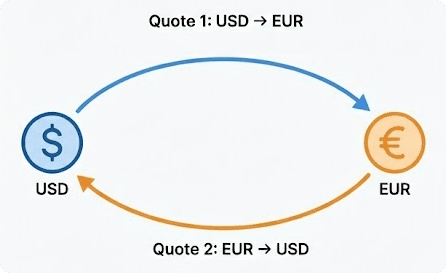
Quotes aren't bi-directional! We need two.
If you need both USD→EUR and EUR→USD, request each direction separately. Stripe will not infer one from the other, and attempting to invert an existing rate will result in incorrect amounts.
Basic Example: Using FX Quotes with a PaymentIntent
A common job to be done when expanding internationally is to display a price in a customer's local currency, even if our Stripe account defaults to another one. We want to show a consistent price to our customers, and avoid rate changes between confirmation and capture. Let's say we operate in GBP but want to price in Euro.
Step 1: Request a quote
First we need to get a quote. As this API is still in preview, we need to specify fx_quote_preview=1 in the Stripe-Version header, and make sure we're using a recent API version.
curl https://api.stripe.com/v1/fx_quotes \
  -u "sk_test_123:" \
  -H "Stripe-Version: 2025-08-27.basil; fx_quote_preview=v1" \
  -d "to_currency"=gbp \
  -d "from_currencies[]"=eur \
  -d "lock_duration"=day
Note that from_currencies[] here allows us to specify multiple currencies at one time, and get results in the same quote.
N.B. In payment scenarios, to_currency is typically the Stripe account’s settlement currency, while from_currencies[] contain the currencies your customers pay in.
In Connect transfer scenarios, this relationship reverses — the platform's balance currency becomes from_currencies[], and the connected account's payout currency becomes to_currency.
We could use one quote to see what conversion rate we'd have into GBP from EUR and from USD, for example. By default the API returns the current FX price. We may want extra security against the FX rate moving again before we process our transaction. The lock_duration parameter will ensure the quote is honoured for a longer period.
After making the request, we receive a response that includes a locked conversion rate and the quote ID (fxq_xxxxxx). Note that we're asking for the rate here - it doesn't matter what amount we want yet, this is purely giving us the data for our rate calculation.
{
  "id": "fxq_xxx",
  "object": "fx_quote",
  "created": 1764940650,
  "lock_duration": "day",
  "lock_expires_at": 1765027050,
  "lock_status": "active",
  "rates": {
    "eur": {
      "exchange_rate": 0.853682,
      "rate_details": {
        "base_rate": 0.872885,
        "duration_premium": 0.002,
        "fx_fee_rate": 0.02,
        "reference_rate": 0.8745,
        "reference_rate_provider": "ecb"
      }
    }
  },
  "to_currency": "gbp",
  "usage": {
    "payment": {
      "destination": null,
      "on_behalf_of": null
    },
    "transfer": null,
    "type": "payment"
  }
}
There's a lot going on in this payload, but the main fields we care about are rates.eur.exchange_rate and rates.eur.rate_details.base_rate. The eur value here represents our customer's currency, which we want to convert to our preferred choice of GBP. If we'd asked for a conversion from US Dollars, it'd be rates.usd.exchange_rate, and so on.
The exchange_rate parameter is inclusive of Stripe's fee for providing the FX, while base_rate is exclusive. If we want our customer to bear the full cost of the conversion, we divide our target price (£100) by exchange_rate (0.853682) and will want to charge our customer €117.14. If we as a business are happy to absorb the cost of FX conversion, then we would divide by base_rate (0.872885), charging our end customer €114.56.
| Use case | Figure to use |
|---|---|
| Customer covers Stripe's FX fee | exchange_rate |
| Our business absorbs FX fee | base_rate |
Step 2: Attach the quote to a PaymentIntent
Once we have the quote, the key part is to attach it to the payment we're trying to initiate. We want to receive £100, and want our customer to pay the full FX, so we use the calculation based on the exchange_rate value. We're specifying the currency and amount in the presentment currency (EUR):
curl https://api.stripe.com/v1/payment_intents \
  -u "sk_test_123:" \
  -H "Stripe-Version: 2025-08-27.basil; fx_quote_preview=v1" \
  -d "amount"=11714 \
  -d "currency"=eur \
  -d "fx_quote"=fxq_xxxxxx   # The important bit!
We mentioned earlier the importance of getting the to_currency and from_currencies[] parameters the right way around. If you had them the wrong way round, Stripe will still provide a quote, but will throw an error when we try to create a PaymentIntent with that quote:
"error": {
  "message": "The FX Quote's to_currency: \"eur\" must match the payment intent's settlement currency: \"gbp\".",
  ...
}
The PaymentIntent presented to the end user for €117.14 will, once paid, land as £100 in our Stripe account. We've removed any uncertainty as to what the customer will be charged, or what we'll receive.
An aside on Fees
This API allows us to ensure that £100 reaches our Stripe account after FX fees have been applied. However, it's important to remember that we are still liable for the Stripe fees on that £100, as we would be with any GBP-native transaction. FX quote locking affects only the conversion path, not transactional fee calculations.
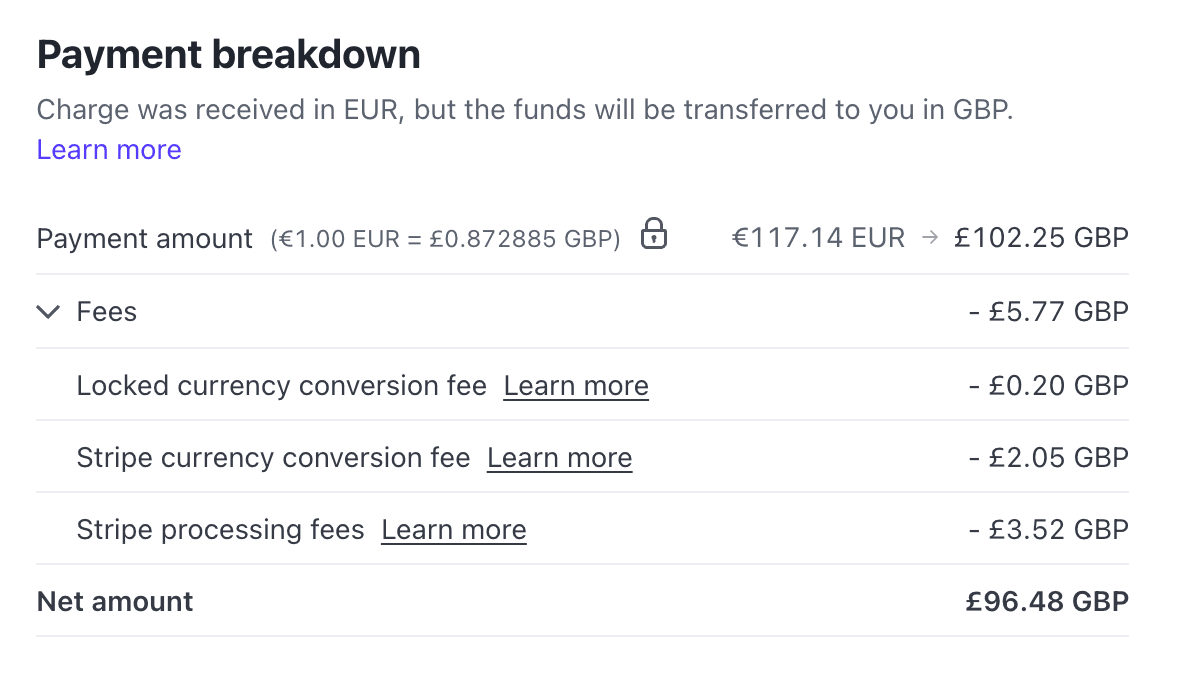
Fee conversion breakdown
In the Stripe dashboard for this payment, in the Payment breakdown we can see the fees. The lock icon indicates that we used an FX quote.
The €117.14 was converted to £102.25, of which £2.25 were in FX fees (Stripe currency conversion fee, and the fee for extended locking, as we requested a lock_duration of a day originally). This leaves us with £100 post-conversion, but we are still subject to Stripe processing fees on this amount, so in this example we end up with £96.48.
Using FX Quotes with Stripe Connect
When working across currency borders with Stripe Connect, currency mismatches can become particularly painful. Platforms may operate in one currency while connected accounts operate in another, and small FX movements can create big operational noise.
There are two common FX scenarios when using Connect:
- Application fees
We charge the end customer in one currency, but the platform fee must be collected in another. This is particularly challenging when application fees are agreed at specific amounts, e.g. 2% + £2, but the customer is paying in euros and settlement will be in GBP. - Transfers between the platform and connected accounts
We may need to send funds to a connected account in their local currency, even when our own platform balance is in a different one. Here, precision matters: creators, restaurants, and merchants expect payouts to be exact, not "approximately correct".
In the same way we used a quote for PaymentIntents to guarantee what we receive, the API can also guarantee what we collect as a platform through application_fee amounts. The mechanics are identical, so we won't dwell too much on them here beyond linking back to the documentation.
A second, and often more important, case for platforms is Transfers - when the platform must move funds from its own balance to a connected account, in our case, across currencies.
Example: Guaranteeing a Connected Account Receives Exactly €20
Imagine we're a food-delivery platform running a 20% off promotion for customers. A customer orders €100 of food, paying €80 to our platform. The €80 customer payment settles to our platform; the remaining €20 owed to the restaurant must be topped up from our platform's own balance. If our platform operates in GBP and a restaurant operates in EUR, we need to transfer exactly €20 to the restaurant from our GBP balance to make our restaurant partners whole.
Rather than guessing based on mid-market rates or hoping the conversion works out at settlement, we use a quote.
Step 1: Request the quote (in the correct direction!)
Because we're preparing a Transfer, we must specify this in the usage[type] field. The quote must represent GBP → EUR, because we want to know how many pounds must be deducted to produce exactly €20. Note that we've also had to specify our transfer destination in this call, listing our restaurant partner's CONNECTED_ACCOUNT_ID. N.B. When dealing with Transfers, the only available lock_duration values are five_minutes or none. The expectation is that we'll be retrieving this quote pretty much immediately before actioning a Transfer.
curl https://api.stripe.com/v1/fx_quotes \
  -u "sk_test_123:" \
  -H "Stripe-Version: 2025-08-27.basil; fx_quote_preview=v1" \
  -d to_currency=eur \
  -d "from_currencies[]"=gbp \
  -d lock_duration=five_minutes \
  -d "usage[type]"=transfer \
  -d "usage[transfer][destination]"="{{CONNECTED_ACCOUNT_ID}}"
This returns an FX quote (fxq_xxx) containing the guaranteed GBP→EUR rate.
{
  "id": "fxq_xxx",
  "object": "fx_quote",
  "created": 1764943436,
  "lock_duration": "five_minutes",
  ..
  "rates": {
    "gbp": {
      "exchange_rate": 1.12215,
      "rate_details": {
        "base_rate": 1.14587,
        ..
      }
    }
  },
  "to_currency": "eur",
  "usage": {
    "payment": null,
    "transfer": {
      "destination": "{{CONNECTED_ACCOUNT_ID}}"
    },
    "type": "transfer"
  }
}
Step 2: Create the Transfer using that quote
We previously looked at the rate fields we need to use when working out the amount to transfer. As a quick reminder:
| Use case | Figure to use |
|---|---|
| Customer covers Stripe's FX fee | exchange_rate |
| Our business absorbs FX fee | base_rate |
We previously used the exchange_rate in our calculations to ensure we got the full amount for our platform, with customers covering the FX fee. However, in this example, we want our connected account to be made whole, so we as a platform will be absorbing the fee. This means that we'll use the base_rate when making our calculation.
As our platform operates in GBP, we'll be making a GBP-denominated transfer. €20 divided by the base_rate of 1.14587 gives us £17.45.
curl https://api.stripe.com/v1/transfers \
  -u "sk_test_123:" \
  -H "Stripe-Version: 2025-08-27.basil; fx_quote_preview=v1" \
  -d amount=1745 \       # Converts to €20
  -d currency=gbp \
  -d destination="{{CONNECTED_ACCOUNT_ID}}" \
  -d fx_quote=fxq_xxx
When the transfer is initiated, we can see that the FX quote has been successfully attached, as the fx_quote field is populated:
{
  "id": "tr_xxx",
  "object": "transfer",
  "amount": 1745,
  ..
  "currency": "gbp",
  ..
  "destination": "{{CONNECTED_ACCOUNT_ID}}",
  ..
  "fx_quote": "fxq_xxx",
  ..
Stripe deducts £17.45 from the platform balance and guarantees the connected account receives exactly €20. No reconciliation surprises, no corrective payouts - no guesswork!
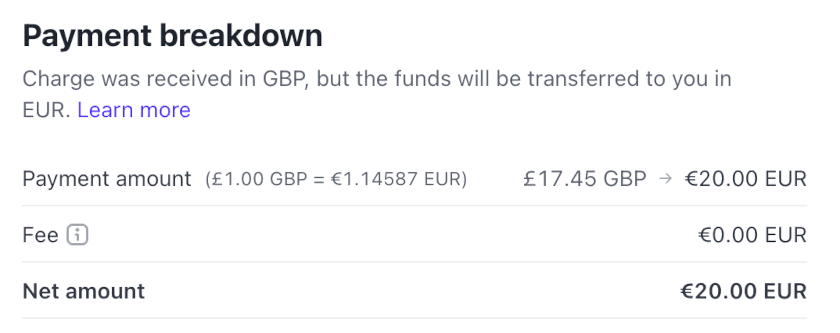
Transfer arrives at full value
This flow is particularly valuable for:
- platform-funded incentives or “make-whole” adjustments
- creator/merchant payouts where even small discrepancies cause confusion
- cross-border marketplaces aiming for predictable accounting
The key takeaway is that the quotes give us deterministic transfer amounts, which is exactly what our marketplace partners expect.
Why is this better than pricing everywhere in GBP / my home currency of choice?
A common question when we talk to companies about this API is "Today I price in GBP, my customers pay the card conversion fee, and I get £100. If I use this API, my customers still end up paying the conversion fee, and I still get £100. Why bother?" The key thing here is that you are able to make it very clear to your customers exactly how much they will pay in their local currency. This eliminates the unpleasant surprise they get from later seeing a bank FX charge.
It also helps with the conversion rate on customers who fall out of the checkout funnel precisely from a fear that they don't know how much £100 converted locally will be. Being able to tell your customers exactly how much it will be ahead of purchase, in their local currency, is a key part of establishing trust as you expand internationally.
How long is the quote valid for?
By default the quote returns the current market rate. It's possible to "lock" it to a longer timeframe. The lock_duration parameter controls how long the quote is valid for. This can be set to 5 minutes, an hour, or a day. Longer lock times are available on request, subject to Stripe approval. An important thing to note here is that Stripe charges a higher fee for reserving this quote - the duration_premium field includes the fee charged for holding on to the quote.
One thing to note is that the quote may still expire within this time! If we have a quote which is supposed to last a day, and there's significant movement in the FX rate, Stripe reserves the right to cancel the quote. How much volatility is too much? It depends on what we're trying to use the lock for.
An extended rate quote created for payments has a 3.5% rate threshold, and an extended rate quote for transfers has a 1% rate threshold. If an exchange rate exceeds these thresholds, the extended rate quote is invalidated, with lock_status changing to expired.
If a quote has been invalidated due to market movements, we can be notified of this via the fx_quote.expired webhook. This event also fires when the quote elapses naturally.
The examples we've used today work well for credit cards, but there are additional caveats if you're using a non-card / delayed settlement payment method:
Some non-card payment methods take longer to process payments than a 24-hour locking period covers. For these payments, the extended rate quote might expire or become unusable because of significant mid-market rate changes. In these cases, we use the mid-market rate to process the payment.
Can I use the same quote for multiple transactions?
Maybe you plan to do multiple transfers between two currencies in short succession. Or you want to get a quote that lasts a day, put the value in a local cache, and ensure your frontend reliably shows that price in all places localised pricing is shown. In either case, you may want to get a quote and use it multiple times.
The good news is that the same quote can be used on multiple PaymentIntents or Transfers, provided it has not expired. An attempt to use an expired quote will trigger a 400 error.
Other Caveats: Preview Status, Countries & MCCs
At the time of writing (Dec 2025), the FX Quotes API is still in preview, with support limited to certain countries and particular merchant categories. If you're planning to build on it, check the docs before implementing anything substantial.
Once the feature exits preview, the list should widen, but for now, it's worth flagging that not every account will be eligible.
Predictability Beats Guesswork
Currency conversion is one of those things that feels like it should be simple, yet quietly introduces inconsistencies everywhere it appears. Stripe's FX Quotes API brings a welcome level of predictability. Instead of treating FX as a moving target, you treat it as a known value: a quote with limits, an expiry, and a guaranteed outcome.
If you price in multiple currencies, settle across currencies, or run a platform where transfers have to be correct, the FX Quotes API gives you a structure that is far more reliable than hoping for the best at capture time.
For anyone who has dealt with inconsistent cross-currency amounts, reconciliation headaches, or "off by two cents" support tickets, the FX Quotes API is exactly the kind of tool you want in your toolkit. If you work with more than one currency, this API turns uncertainty into something you can predict, document, and reconcile reliably!