
Making My Website Agent-Friendly: A WebMCP Field Test
The fastest way I know to understand a new web standard is to bolt it onto something I already run and see what works and what doesn't. WebMCP lets a website hand an AI agent a set of tools instead of making it squint at the page and guess where to click. So I wired it into one of my side projects as a testbed, and measured what it actually saves. This post covers the theory, the demo, the numbers, and how to switch it on in your own application.
What WebMCP actually is
WebMCP is an attempt to help agents navigate web apps more easily. Instead of your website being something an AI agent looks at, it becomes something an agent can call.
For the last couple of years, "an agent used my site" meant browser automation - screenshot the page, find the button, click it, pray the DOM hadn't moved. It works until it doesn't, and it's expensive: the model re-reads a wall of HTML on every step. WebMCP flips the approach around. A page registers available tools with document.modelContext.registerTool({...}) - each with a name, a description, a JSON-Schema for its inputs, and a function that does the thing. If that looks like a normal MCP tool, that's deliberate: it's almost exactly MCP, with the browser handling the transport and the agent handshake. An agent on the page sees the tools and calls them like any other.
The difference from a classic MCP server is the entry point. These tools live in the page the visitor already has open, using their session, rather than on a server your agent dials out to.
What it's good for today
While it's a new proposal, it isn't just a toy standard - the companies pushing it hardest are in payments, where "the agent clicked the wrong button" makes for a pretty bad day at the office.
Stripe's write-up on designing Checkout for AI agents makes the case for why. Their baseline (an agent completing a checkout the old way, reading the DOM and clicking) burned 1.8 million tokens, making ~40 tool calls for a single purchase, and taking over two and a half minutes to do so. This makes the commerce part of agentic commerce "slow, indirect, and token-intensive." WebMCP lets the site expose MCP tools directly to agents instead. A site can expose explicit tool contracts, rather than the agent relying on brittle DOM-crawling. A big win here is that these tools can be wired to the same interface humans already use so there's no second codebase to maintain.
In Stripe's example, they register tools like get_order_summary, select_payment_method, fill_payment_form, submit_payment as part of the checkout. The really clever part is progressive disclosure of capabilities. This means that the page only exposes tools that are relevant to the current stage of the checkout, rather than forcing the agent to read a full tool list every time. Selecting a payment method reveals the form-filling tool; a completed, valid form is what surfaces submit_payment; switching to a non-card method drops the card-number field. Stripe describe this as being like pruning a tree: trim the branches to walk the agent toward the final outcome we want. The agent never holds a giant static menu of everything the page can do; it's handed the few tools that make sense right now, with live schemas.
So how does an agent actually get the tools?
WebMCP is a browser feature. The tools you register exist inside the tab, and they're offered to whatever agent is driving that browser, on that page.
Who actually benefits - not your terminal. If you've got Claude Code or Codex open in a shell, they will not see these tools by default. They’re working in a terminal, not a browser that speaks modelContext. The agent that benefits is an in-browser one: a browser extension that bridges a page's tools to an assistant, or a headless browser automation that reads the API (Codex or Claude Code deliberately driving a headless Chrome, for example). If the thing answering your question is sitting in the browser on the page, it can use the tools. Anywhere else, it can't.
Is there a magic word to trigger these tools? No. You ask your browser agent a normal question ("find the time they talked about coffee and play it") and if the page has registered tools, the agent sees them listed for the current tab. For example, my side project site is a searchable podcast archive with in-built media player, so an agent may call search_transcripts instead of squinting at rendered HTML and guessing where to click. Same query either way; the only difference is whether the page handed the agent labelled tools or left it to drive the UI blind. That "drive the UI blind" path is typically the one which is very token-heavy (see numeric comparisons below).
Do I declare it in a manifest? Not today. The tools live in site code (the JavaScript that runs registerTool when the page loads), and the agent discovers them at runtime, once it's on the page. There's not currently anything like a .well-known file an agent fetches to learn my capabilities before it visits; that's floated as future work but hasn't shipped. So the rule right now is that an agent can't know what my site offers until it's already looking at it.
And it's fluid. Because registration is just JavaScript, the tool list is live. I can expose different tools on different pages, or register and unregister as state changes, and a capable agent re-reads the set as it goes. Mine register on every page that shares the search layout; a shop might only offer "add to cart" once you're on a product. Stripe's example of progressive tool enablement during a checkout flow is the gold standard here - keeping a tight rein on context an agent needs to manage at any point in the transaction.
Concretely, you register each tool as the page state makes it relevant:
// Search makes sense everywhere, so register it up front:
document.modelContext.registerTool(searchTool)

// "Add to cart" only makes sense once the visitor is on a product page.
// Declare it when they get there, not before:
onEnterProductPage(() => {
  document.modelContext.registerTool(addToCartTool)
})
When you register that new tool, the browser fires a toolchange event on document.modelContext, and an agent reads the current set with getTools(). So a well-behaved browser agent re-calls the list after each step, rather than trusting the list it saw on arrival. Pulling a tool back when its state passes is just as easy, and standard: registerTool accepts an AbortController signal, so the browser withdraws the tool for you, with nothing custom to build.
The honest caveat is that re-checking is the agent's job, not something the page can force, and there's no return field that means "look again now." A reliable backstop is to have the state-changing tool announce what it unlocked right in its result text, so even an agent that doesn't re-poll getTools() gets the nudge:
// A state-changing tool can point the agent at what it just unlocked:
execute: async ({ method }) => {
  selectPaymentMethod(method) // this also registers fill_payment_form
  return {
    ok: true,
    hint: 'Payment method set - fill_payment_form is now available; call getTools() to refresh.',
  }
}
The same question, two separate flows. An agent-driven query like "Find a conversation about a coffee order and play it" looks like this without the tools - the agent working the page like a person:
fetch_page("/?q=coffee+conversation")
//     → ~26,000 tokens of results markup to read
// parse it, pick a likely hit, work out the episode and how to open it…
fetch_page("/episodes/ep-84-1")
//     → another page to read, then try to drive the player
When we have WebMCP tooling, it looks more like this:
search_transcripts({ query: "coffee conversation", mode: "semantic", limit: 3 })
→ { results: [{ episode_title: "Yester-YAY!", speaker: "David O'Doherty",
       at: "22:14", segment_id: 1446088,
       url: "/episodes/ep-84-1?segment=1446088" }] }

open_moment({ episode_id: 668, segment_id: 1446088 })
→ { success: true }   // the player jumps to 22:14
This is the same question, ultimately getting to the same point. One path is two labelled calls and about a thousand tokens; the other is several page-reads, tens of thousands of tokens, and a fair chance of clicking the wrong thing. When WebMCP works well, the agent didn't need telling the tools were there - it saw them the moment it landed on the page.
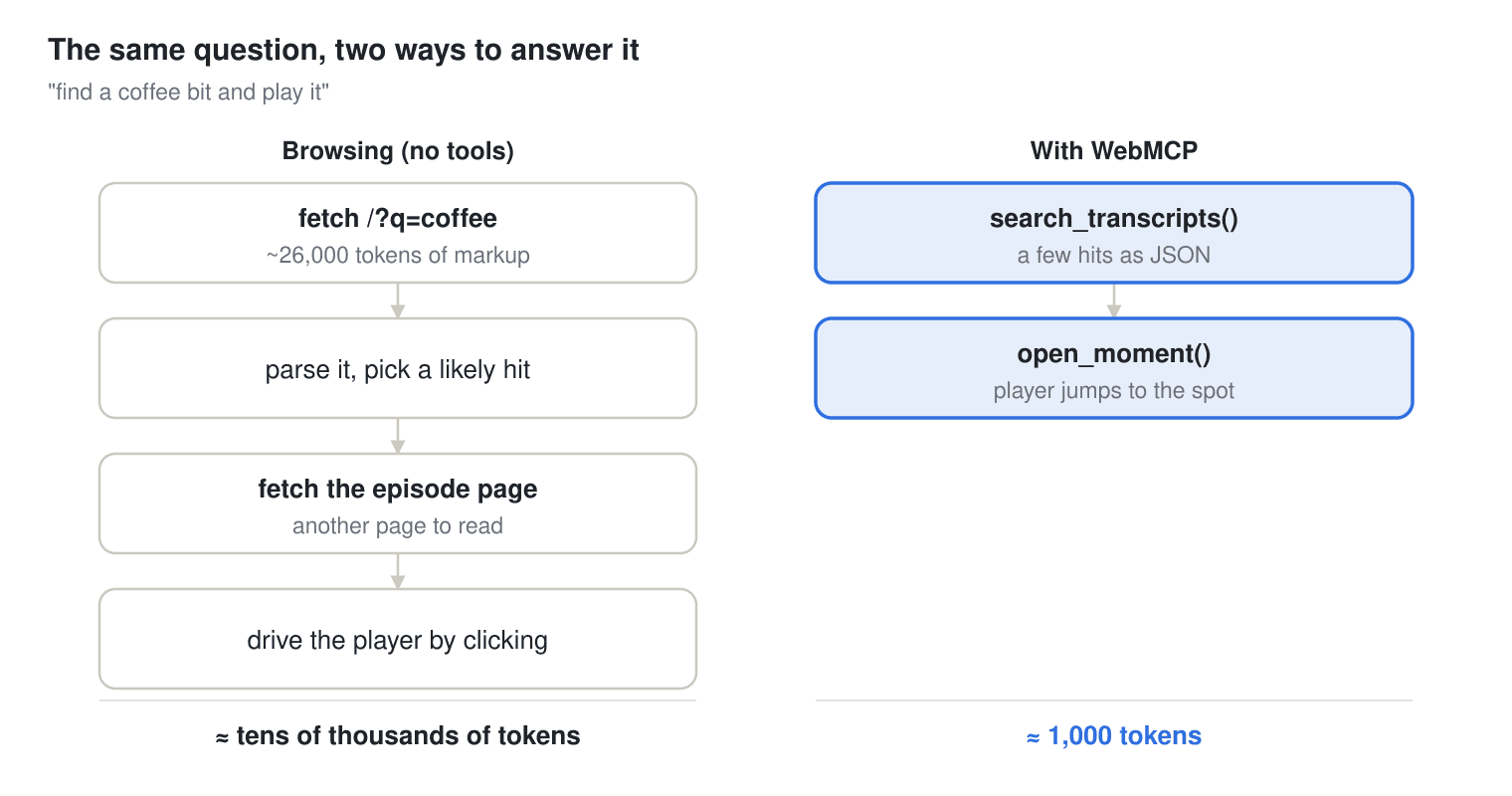
One question, both ways: approximate token cost
The right-hand path is the same two labelled calls from the code above, drawn against everything browsing has to do to reach the same answer.
WebMCP, or a plain MCP server?
Why WebMCP, and not a server-side MCP instead?
They're not really rivals - they're different front doors to the same data. WebMCP is for "help me while I'm on the site": the agent lives in the visitor's browser, uses their session, and can visibly drive the page. A server-side MCP is for "let my coding agent research the archive at 2am with no browser open anywhere."
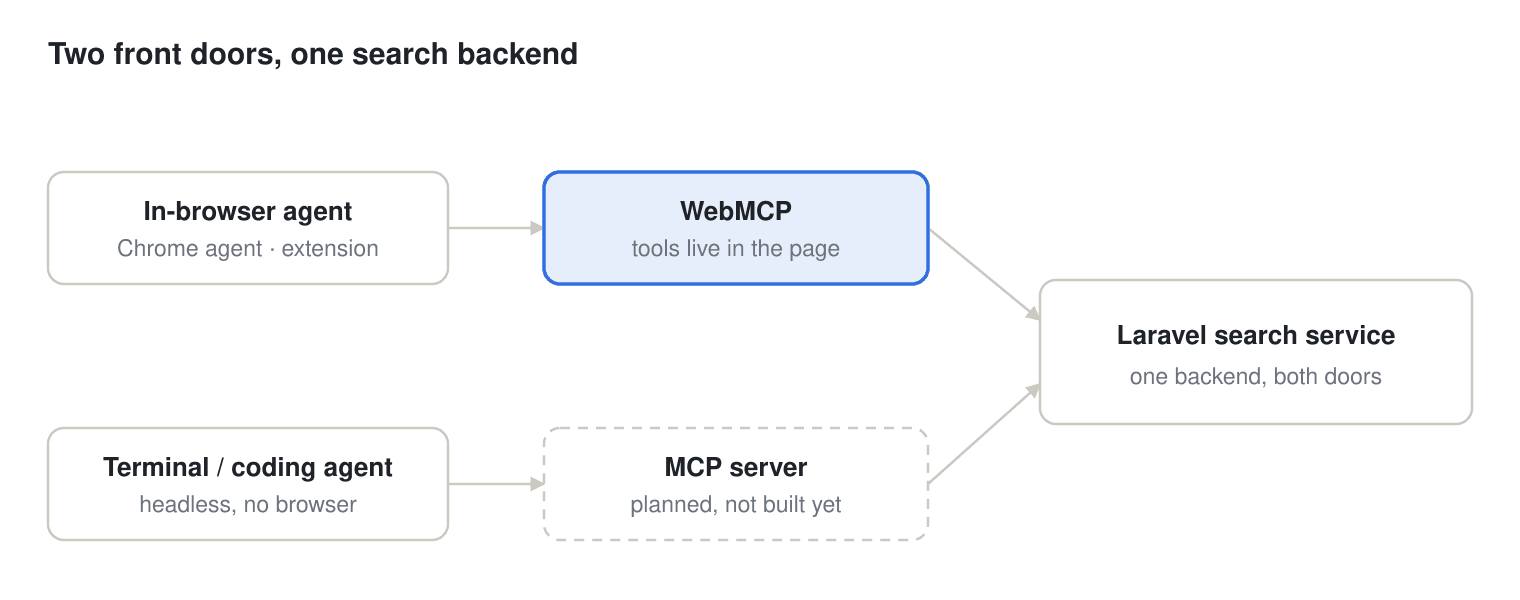
WebMCP and a server MCP: two front doors to one shared backend
The only real difference is where the agent sits; the service it calls is the same either way.
And auth comes free on the browser side. Because the tools run in the visitor's own tab, they inherit whatever session is already there. A tool's fetch to my endpoints carries exactly their privileges, and I wrote no auth code to get it. The server-side MCP spec is still moving around how best to handle auth. An API key in an env var here, a personal access token there, the full OAuth 2.1 flow the MCP spec is settling on, and every client has to wire up whichever one a given server chose. The web solved "who is this user" years ago, and WebMCP gets a free piggyback ride here.
This improved auth does carry higher risks. An in-browser agent acts as the logged-in user, so anything consequential (a purchase, a delete) likely wants a confirmation gate. This is what a tool's consequentialHint is for: you mark the tool with it when you register it, and the browser should step in to make the user approve the call before it runs.
document.modelContext.registerTool({
  name: 'delete_episode',
  description: 'Remove an episode from the archive.',
  inputSchema: {
    type: 'object',
    properties: { episode_id: { type: 'number' } },
    required: ['episode_id'],
  },
  consequentialHint: true, // the browser gets the user to confirm before this runs
  execute: async ({ episode_id }) => reply(await destroyEpisode(episode_id)),
})
For this project I went for WebMCP, primarily for the reasons from the top of the post - it's an interesting new tech, and I wanted to see what does (and doesn't!) work. Watching an agent type a query, read the surrounding context, and make my audio player jump to the exact moment (live, on screen) is a nice validation that it all works! And because both WebMCP and MCP would call the exact same Laravel search service underneath, choosing one now costs me nothing later. I can bolt on the server version the day I actually want headless access.
The demo: searching a podcast archive
To kick the tyres on something real, I wired WebMCP into Everything Is Showbiz, my full-transcript search for the What Did You Do Yesterday? podcast - ~200 episodes, 2.3 million words, semantic and exact search, speaker and date filters, and a player that jumps to any moment.
It's good at straight searches like "producer mars bar". It's less good at the type of broader queries you may have - "how many producers are there, and how often are they mentioned?" That's a few compound searches and some reasoning stitched together, which is exactly the shape an agent is good at, if the site can hand it the right tools.
So I exposed five read-only tools, each a thin wrapper over something the site already did for humans:
- search_transcripts - semantic or exact search, with speaker/type/date filters.
- get_transcript_context - the turns around a given line, so an answer isn't a quote ripped from context.
- open_moment - opens the episode in the player and seeks to the moment.
- count_mentions - a real database total for an exact phrase, with a per-speaker breakdown.
- get_archive_stats - the precomputed league tables (who talks most, swear counts, catchphrases), each with the definition it was computed under.
The kinds of question that go from awkward to one-shot: "find a bit about the Faroe Islands and tell me the episode", "who's the chattiest guest?", "Can you summarise for me what has been said about Stevenage over the podcast lifetime, and play the latest conversation where it has been mentioned?" - a count, a search, a stat, a context-grab, each handled by the matching tool instead of the model paging through rendered HTML.
Enough talk, show me the money measurements
The headline is: a median ~27× fewer tokens, at roughly 1/22 the cost.
I ran a gpt-4o-mini agent at 10 typical questions, each 10 times, under two conditions - one tool that just returns a page's text (how a browser agent drives a site today) versus the WebMCP tools. Every token used is totted up, the model's own reasoning and answer included.
| Question | Browse (avg tok) | WebMCP (avg tok) | Reduction |
|---|---|---|---|
| How often they say "oh sh*t" | 38,346 | 1,408 | 27× |
| Find a coffee bit + which episode | 47,315 | 1,024 | 46× |
| Who talks more, Max or David? | 9,435 | 1,146 | 8× |
| How big is the archive? | 9,408 | 1,020 | 9× |
| Fastest-talking guest | 9,397 | 1,950 | 5× |
| Chattiest guest by talk-time | 9,406 | 1,974 | 5× |
| "you know what I mean" count | 50,307 | 1,150 | 44× |
| Meaden vs Suleyman mentions | 66,368 | 812 | 82× |
| Find a Faroe Islands bit + episode | 53,266 | 2,024 | 26× |
| Producer "Mars Bar" mentions | 46,778 | 717 | 65× |
That's a range of 4.8–82× depending on the question.
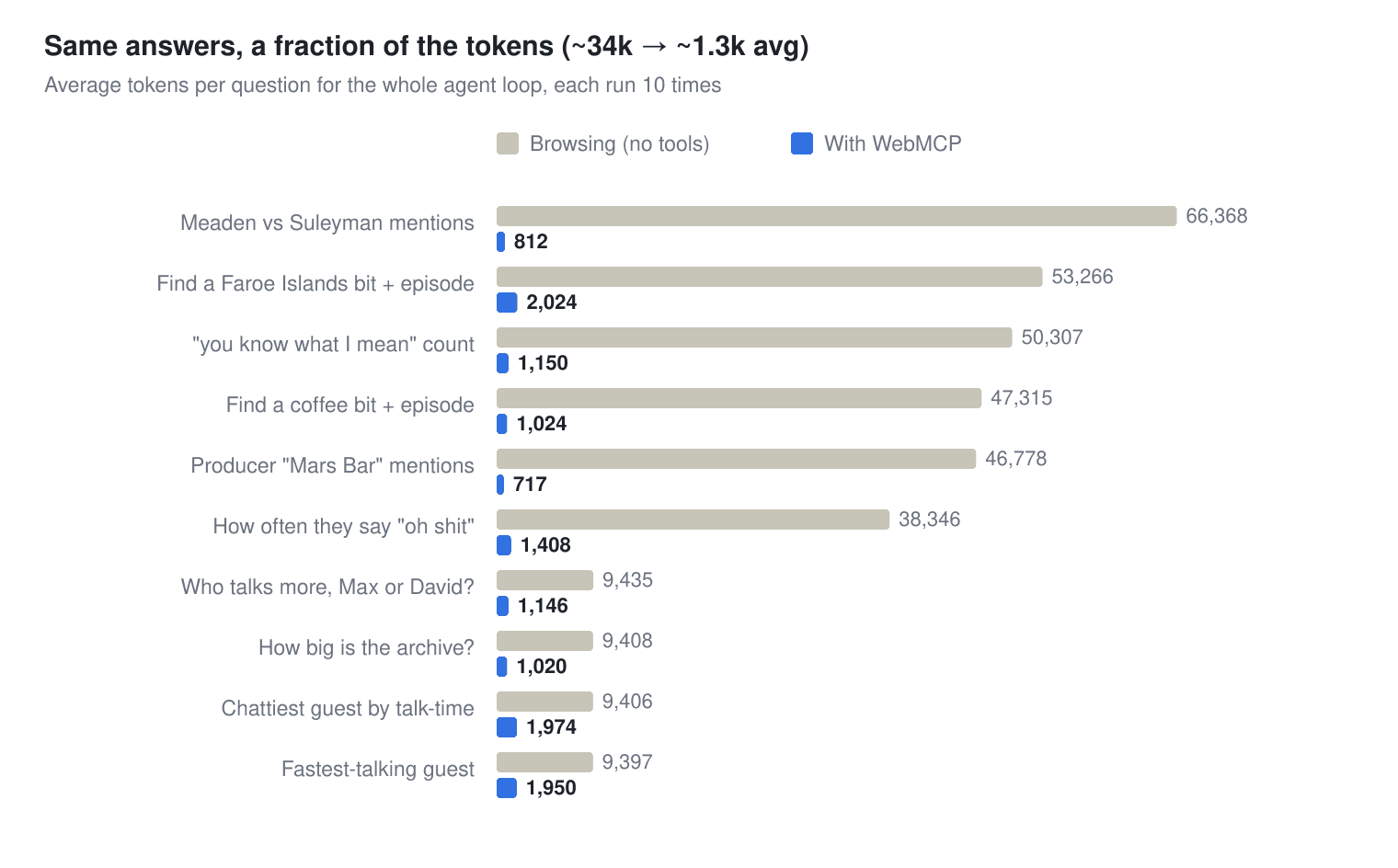
Average tokens per question - browsing vs WebMCP, 10 runs each
Every question came out cheaper with the tools; the size of the win tracks how much page an answer would otherwise have to drag in.
Count only the bytes moved and the gap is far wider. Before the model reasons at all, "how many times do they say 'oh sh*t'?" means reading a ~90,000-token results page to tally by eye. This is against a 93-token {total, by_speaker} from the count tool. That's about a thousand to one in raw payload. It shrinks to the 27× above once you measure the whole loop. This is because the reasoning tokens cost the same whichever way the agent works, and my "browse" baseline is already generous - it returns extracted page text, not the heavier raw HTML a real page agent often ingests. I'd rather quote the conservative figure and show the working.
One huge caveat on these numbers: they assume the agent actually reaches for the tools. In the benchmark it does (I drive the tools directly, the way a working in-browser agent would), but as The rough edges below explains, today's browser extensions don't always discover them without a human nudge. Treat the figures as the ceiling once discovery works, not a guarantee of what every agent spends out of the box.
Most of it was already written
The great thing about adding WebMCP as an agent API to an existing site: if the site's any good, you've already written most of it! Each tool is about as much code as its description needs:
document.modelContext.registerTool({
  name: 'get_transcript_context',
  description:
    'Return the transcript turns around a specific segment, so an answer has context rather than an isolated line.',
  inputSchema: {
    type: 'object',
    properties: {
      episode_id: { type: 'number' },
      segment_id: { type: 'number' },
      window: { type: 'number', minimum: 1, maximum: 30 },
    },
    required: ['episode_id', 'segment_id'],
  },
  execute: async ({ episode_id, segment_id, window = 6 }) => {
    const res = await fetch(
      `/episode/${episode_id}/segments?around_segment=${segment_id}&window=${window}`,
    )
    return reply(await res.json())
  },
})
That fetch hits an endpoint the front-end already used; across all five tools the only new backend code was one helper that slices an array to a window, plus a thin JSON view of stats the page already computes.
Going live: the Chrome origin trial
When you've built it and want to go live, one thing to remember is that this is still very early-stage. document.modelContext doesn't exist in Chrome unless your origin is enrolled in the WebMCP origin trial. Until then the tools register as a no-op and nothing on the page changes. Switching them on:
- Enrol. Go to the Chrome Origin Trials console, find the WebMCP trial, and register your exact origin (e.g.
https://everythingisshowbiz.com). Tick "match subdomains" if you also servewww.. You get a long token. - Serve the token. Put it on the page as
<meta http-equiv="origin-trial" content="…">(or anOrigin-Trialresponse header). - It expires! Origin-trial tokens are time-boxed - set a calendar reminder, because when it lapses the tools silently go dormant again.
Testing locally is separate. A throwaway dev URL won't hold a stable origin trial token, so enable chrome://flags/#enable-webmcp-testing and restart Chrome. That's also why the code has to no-op gracefully when the token is absent - which is conveniently the same progressive-enhancement behaviour you want in production anyway.
Two more implementation notes - it's Chrome-only while it's a trial, and it does nothing for discoverability. The agent still has to be on the page to learn of the tools. For "let my coding agent research the archive from a terminal with no browser open," that's the server-MCP door from earlier, not this one.
Kick the tyres yourself
On any WebMCP site you can check what's live from the DevTools console - this is site-agnostic. The spec gives agents a getTools() call that lists the current set, so the check is short:
;(() => {
  const mc = document.modelContext || navigator.modelContext
  const meta = document.querySelector('meta[http-equiv="origin-trial" i]')
  console.log('origin-trial meta:', !!meta, '| modelContext:', !!(mc && mc.registerTool))
  if (!mc || !mc.registerTool) {
    return console.log('Dormant - needs Chrome 149+ and an origin-trial token (or chrome://flags/#enable-webmcp-testing).')
  }
  if (!mc.getTools) {
    return console.log('modelContext is present but has no getTools() - update Chrome.')
  }
  mc.getTools().then((tools) => {
    console.log(`${tools.length} tool(s) live on this page:`)
    for (const t of tools) console.log(`  • ${t.name} - ${t.description ?? ''}`)
  })
})()
Anything it lists is a tool the page has handed the agent.
The rough edges (and how to get past them)
So far, so simple, right? You've implemented the endpoints in your js, and are ready to share it with the world. One snag you'll currently hit (Oct 2026) is that the spec has moved faster than the tools built on it, so common browser drivers like the browser extensions for Claude or ChatGPT aren't always fully up to speed. The object moved from navigator.modelContext to document.modelContext months ago, and shipping agents are still catching up, so even on a page that registers tools correctly your agent may need a nudge or two before it finds them.
Claude's Chrome extension got there, but not on the first ask. Out of the box it only looked at navigator.modelContext, decided there was no WebMCP, and offered to drive the search box like a normal page. Only after I pasted the feature-detect snippet above (which checks document.modelContext too) and told it to look there did it find the tools and call count_mentions - the right answer, straight from the database. The capability was there; the discovery step wasn't. One temporary measure you can take is to alias the old navigator.modelContext to document.modelContext, and Claude picks it up a bit more naturally then.
export function exposeModelContextOnNavigator(doc, nav) {
  const d = doc || (typeof document !== 'undefined' ? document : null);
  const n = nav || (typeof navigator !== 'undefined' ? navigator : null);
  if (!d || !n) {
    return false;
  }
  const mc = d.modelContext;
  if (!mc || n.modelContext) {
    return false;
  }
  try {
    n.modelContext = mc;
    if (n.modelContext === mc) {
      return true;
    }
  } catch (e) {
    // Assignment can be refused if the platform guards the property; fall
    // through to defineProperty below.
  }
  try {
    Object.defineProperty(n, 'modelContext', {
      value: mc,
      configurable: true,
      writable: true,
    });
    return n.modelContext === mc;
  } catch (e) {
    return false;
  }
}
ChatGPT's (Codex) extension was more locked down. By default it gets a restricted, read-only DOM view, so document.modelContext just reads undefined and it concludes there's nothing to use. Getting it to work meant turning on three separate things ("Enable site tools," the domain set to always-allow for browsing, and "Enable full CDP access" in the developer settings), and even then it took a couple of rounds of "check again" before it asked for elevated permission and actually invoked the tools. Once over that hump it answered fine, but it does require regular reminding that the tools exist on new sessions.
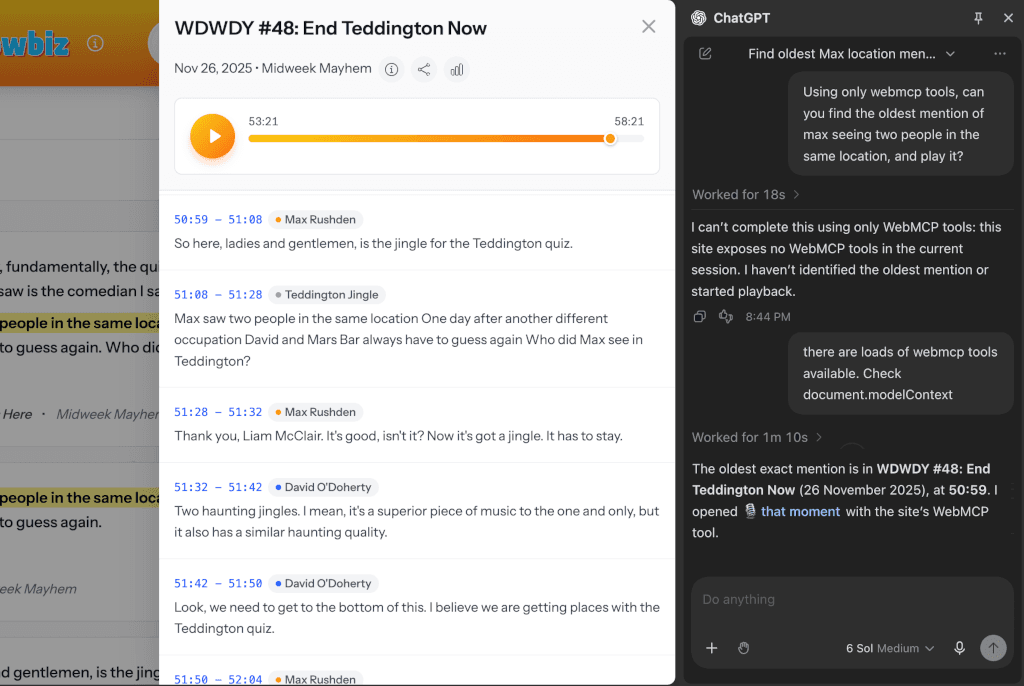
Codex needs a few extra pointers to find the available tools
So the practical advice today: expect to grant explicit permissions per agent, and expect to tell the agent, more than once, to check document.modelContext for registered tools rather than trusting its own tool list or the accessibility tree. None of this is really WebMCP's fault; it's the lag between a spec that's still moving and the agents racing to catch up. It will smooth out - given the scale of token savings available, there's a lot of incentive to get this right, and quickly! For now though, a human often has to point the agent at the open door before it walks through.
Beyond a side project
The real payoff is that the archive now exposes its data in a structured, agent-friendly way: the same queries a person runs are callable, cited, and cheap for a model to use. On a side project that's a pleasant nice-to-have. But Stripe's checkout numbers are the more impressive real-world case: faster conversions, fewer tokens, and a more predictable path through your app are turning into real competitive levers in the agentic era. WebMCP is a low-cost way to start pulling them.